Planifier un voyage avec l'IA : le guide étape par étape (2026)
July 14, 2026 · 8 min read
Planifier un voyage, c'était une dizaine d'onglets ouverts dans le navigateur, un tableur à moitié rempli et une appli de notes pleine de liens qu'on ne rouvrira jamais. L'IA peut désormais faire le gros du travail. Elle transforme une destination et quelques dates en un vrai plan jour par jour, modifiable, qui vous suit sur le terrain. Voici comment s'y prendre, étape par étape, avec Travolp comme exemple.
Pourquoi planifier son voyage avec l'IA
Pour être honnête, l'IA est surtout douée pour la partie fastidieuse de la planification. Elle peut partir d'une idée vague, disons « cinq jours au Japon en novembre, on aime la cuisine et les vieux temples », et en tirer un premier jet cohérent : les jours sont regroupés, les lieux placés sur la carte, le rythme pensé pour éviter de traverser la ville quatre fois dans la même journée. Ce premier jet est rarement parfait, mais une base à laquelle réagir vaut toujours mieux qu'une page blanche.
Ce que l'IA ne sait pas faire, en revanche, c'est lire dans vos pensées. L'astuce consiste donc à lui donner assez d'indications dès le départ, puis à la guider comme on guiderait un collaborateur, plutôt que d'attendre une réponse magique du premier coup.
Envie de suivre le guide en pratique ? Vous pouvez télécharger l'application ou vous connecter sur le web et faire chaque étape en même temps que vous lisez.
Étape 1 : une destination et des dates

Commencez par les deux choses que vous connaissez déjà : où et quand.
- Choisissez votre destination (une ville ou plusieurs, un voyage multi-villes fonctionne tout aussi bien).
- Fixez vos dates. Si vous n'avez qu'une période approximative, ce n'est pas grave, vous ajusterez plus tard.
Les dates comptent plus qu'on ne le pense. Travolp récupère une vraie prévision météo pour les voyages proches (et s'appuie sur ses connaissances saisonnières pour les voyages plus lointains), et vérifie les jours fériés à destination. Le plan peut ainsi vous éviter ce qui sera fermé ou pris d'assaut, et vous orienter vers les fêtes qui valent le détour.
Étape 2 : dites-lui vos goûts (ne sautez pas cette étape)
L'itinéraire générique, c'est ce dont tout le monde se plaint. La solution : dire à l'IA ce que vous aimez avant qu'elle ne planifie quoi que ce soit.
Travolp fait cela avec un test de goûts rapide, une série de vraies photos de lieux (cafés, musées, marchés, points de vue, restaurants) que vous swipez. Vos préférences construisent un profil qui vous suit sur tous vos voyages. Vous préférez un quartier tranquille aux attractions les plus connues ? L'appli le retient. Vous voyagez avec des enfants ou une personne à mobilité réduite ? Réglez le rythme et la mobilité du groupe pour que le plan ne se transforme pas en marche forcée.
Quelques éléments qui changent vraiment la donne :
- Taille du groupe, adultes, enfants, et même l'âge des enfants.
- Rythme, tranquille, équilibré ou chargé.
- Centres d'intérêt, cuisine, histoire, nature, vie nocturne, art, etc.
Plus vous en dites ici, moins vous aurez à corriger plus tard.
Étape 3 : générer le plan jour par jour
Place maintenant à l'IA pour construire le premier jet. À partir de votre destination, de vos dates et de vos goûts, elle produit un itinéraire structuré :
- Des jours, chacun avec un court résumé qui plante le décor.
- Des étapes au sein de chaque jour, classées géographiquement pour éviter les zigzags.
- Des trajets entre les étapes, avec un moyen de transport suggéré.
C'est le moment où l'IA justifie sa présence. Plutôt que d'organiser vous-même douze attractions sur trois jours, vous obtenez une trame cohérente en quelques secondes. Pour voir à quoi ressemble un bon premier jet, consultez notre itinéraire de 3 jours à Kyoto, ou allez directement voir un exemple prendre vie sur la page du plan Kyoto.
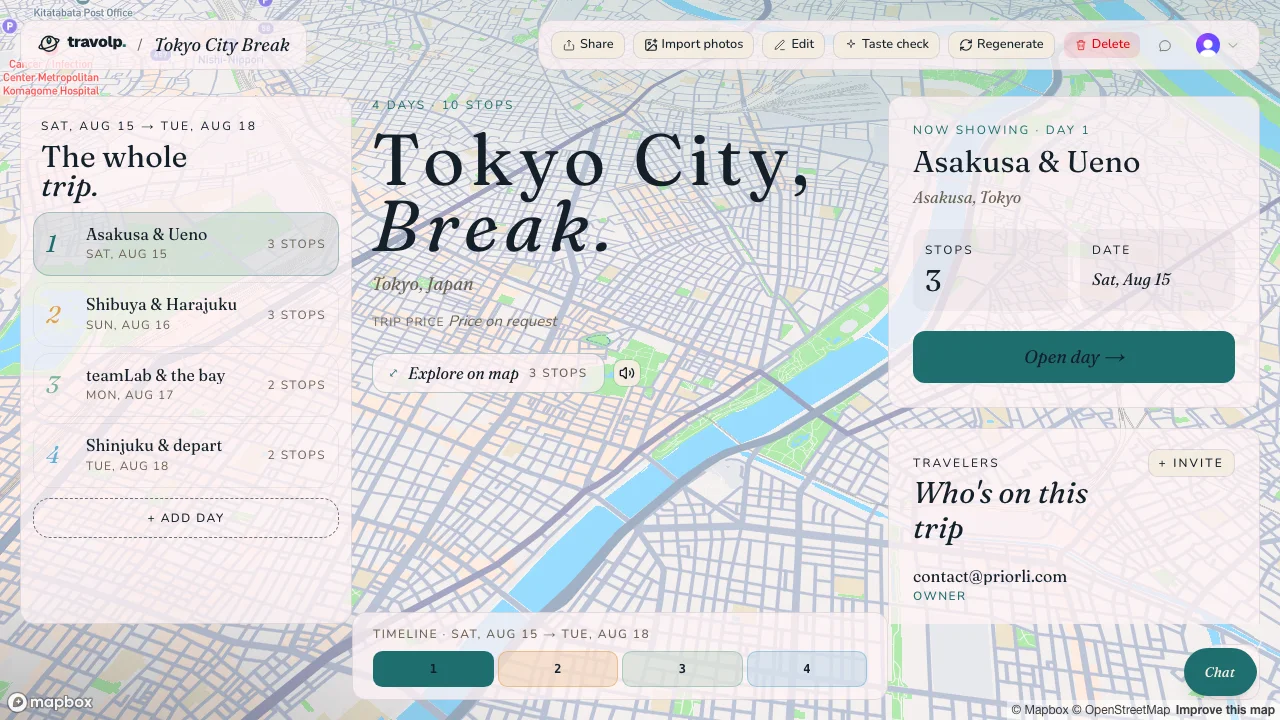
Un premier jet dans Travolp : les jours sur le côté, chaque étape classée et localisée sur la carte, prête à être modifiée par chat.
Étape 4 : modifier le plan en discutant avec lui

C'est là que la plupart des « planificateurs IA » s'arrêtent, et que Travolp continue. Pas besoin de glisser des cases dans un calendrier pour corriger le plan. Il suffit de lui parler.
Écrivez simplement des choses comme :
- « Le deuxième jour est trop chargé, déplace le temple au jour trois. »
- « Ajoute un restaurant de ramen près de notre hôtel pour le premier soir. »
- « On n'est pas trop musées. Remplace la journée art par quelque chose en plein air. »
- « Quel est le meilleur moyen d'aller de la gare à Arashiyama ? »
L'IA peut ajouter, retirer, réordonner ou re-suggérer des étapes, ajouter une journée, ajuster votre rythme, et intégrer à la conversation la météo en direct, les jours fériés ou les options de transport local. Elle se comporte comme un ami bien informé qui aurait la carte entière ouverte sous les yeux. La modification par chat est disponible sur le web comme sur les applications mobiles.
Astuce : demandez des changements, pas la perfection. « Allège le jour trois » donne un meilleur résultat que de redécrire tout le voyage.
Étape 5 : importer vos confirmations de réservation
Si vous avez déjà réservé des vols ou des hôtels, inutile de tout retaper. Sur le web, Travolp peut lire vos PDF de réservation et vos e-mails de confirmation. Déposez toute une pile de documents, ou même du texte collé directement, et l'appli en extrait les vols, les hôtels, les dates et les lieux, puis ancre votre plan autour de ces éléments. Régénérez l'itinéraire : ces réservations restent en place.
Une réserve honnête : cet import de documents n'existe aujourd'hui que sur le web. Les applications mobiles se concentrent sur les photos et l'usage sur place, donc pour l'étape « je balance toutes mes confirmations », c'est le web qu'il faut ouvrir. (Vous pouvez vous connecter au même compte des deux côtés : connectez-vous ici.)
Étape 6 : utiliser le plan pendant le voyage
Un plan qu'on ne peut pas ouvrir sur la route, c'est juste un devoir de vacances. C'est ce qui distingue un simple gadget de planification d'un vrai compagnon de voyage.
Une fois l'itinéraire fixé, l'application mobile le garde avec vous :
- Accès hors ligne. Consultez vos voyages, vos jours et vos étapes sans réseau, pratique en avion ou à l'étranger sans itinérance. Vous pouvez même télécharger des régions de carte pour que la carte (y compris le survol 3D) fonctionne sans connexion. Les modifications faites hors ligne s'accumulent et se synchronisent au retour du réseau. (Plus de détails dans notre guide sur l'utilisation de vos plans de voyage hors ligne.)
- Lens. Pointez l'appareil photo vers une statue, un tableau ou un plat que vous n'arrivez pas à nommer. L'appli l'identifie et vous lit un court guide audio dans votre langue, un guide de musée de poche pour tout ce qui n'a pas d'étiquette.
- Replanification en direct. Les plans changent. La pluie arrive, un lieu est fermé, vous avez pris du retard. Dites-le simplement au chat : il réorganise la journée.
Un exemple concret, du début à la fin

Imaginons que vous et un ami vouliez cinq jours à Kyoto en fin d'automne.
- Vous indiquez Kyoto et vos dates, puis faites un test de goûts rapide. Vous penchez tous les deux pour les temples, le thé et les rues tranquilles plutôt que pour le shopping.
- Travolp génère cinq journées, en organisant les lieux célèbres pour que chaque jour se concentre sur un même secteur. Il remarque que vos dates coïncident avec le pic des érables et en tient compte.
- Vous écrivez : « On veut une matinée tranquille, sans temple. » Le jour quatre s'allège en conséquence.
- Vous importez votre confirmation d'hôtel, le plan se recentre sur ce quartier.
- Une fois sur place, vous téléchargez la région de carte de Kyoto avant de quitter le wifi de l'hôtel, puis utilisez Lens devant un temple pour savoir ce que vous regardez vraiment.
Voilà toute la boucle : une idée vague au départ, un vrai voyage à l'arrivée, et un compagnon dans la poche du début à la fin.
En résumé
- Une destination et des dates pour commencer.
- Vos goûts renseignés (test swipe, rythme, taille du groupe).
- Un premier jet jour par jour généré.
- Des ajustements par chat, pour ajouter, déplacer, échanger ou re-suggérer une étape.
- Les PDF de réservation importés sur le web pour ancrer le plan.
- Le tout emporté en voyage : cartes hors ligne, Lens et replanification à la volée.
Quand vous serez prêt, téléchargez Travolp et testez tout ce parcours sur un voyage que vous préparez vraiment. Et si vous partez en groupe, lisez ensuite comment organiser un voyage de groupe sans le chaos.